
New: Roman numeral dates 🏛️

Dates can now be shown in Roman numerals on your personalized products. They’re a classic look for anniversary gifts, wedding keepsakes, couple hoodies, engraved bracelets and more.
How it works
Your customers pick a date with the date picker, same as always, and the live preview shows it in Roman numerals right away.
Example: April 1, 2022 → IV · I · MMXXII
Set it up in your template
-
Select the text element linked to your date picker.
-
Open Advanced.
-
Pick a Date Format (MM-DD-YY, DD-MM-YY, etc.). The Roman numerals follow that order.
-
Check Roman Numerals.
-
Pick a Separator, like a dash (IV-I-MMXXII) or a middle dot (IV·I·MMXXII).
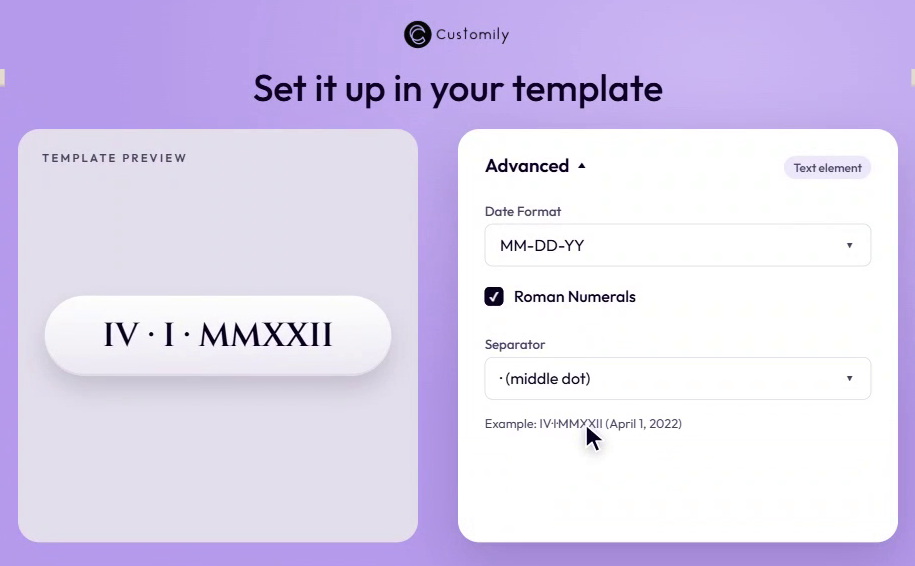
The example under the separator shows the result as you change the settings.
Why it matters
-
Customers don’t have to type Roman numerals by hand, so there are fewer mistakes.
-
You don’t need workarounds with dropdowns or extra text fields.
-
It’s one of the most requested styles for gifts, just in time for the Q4 rush.
Ideal for embroidered hoodies, engraved bracelets, caps with leather patches...

and tons of products and designs you can imagine.
👉 Add it to your products before peak season.