🔹 Pre-Fill Customization Options with URL Parameters 🌐✨
Set prefilled values via URL parameters – A powerful new feature that lets you customize product links by setting initial values dynamically. 📝 Note: Available for Shopify only (for now).
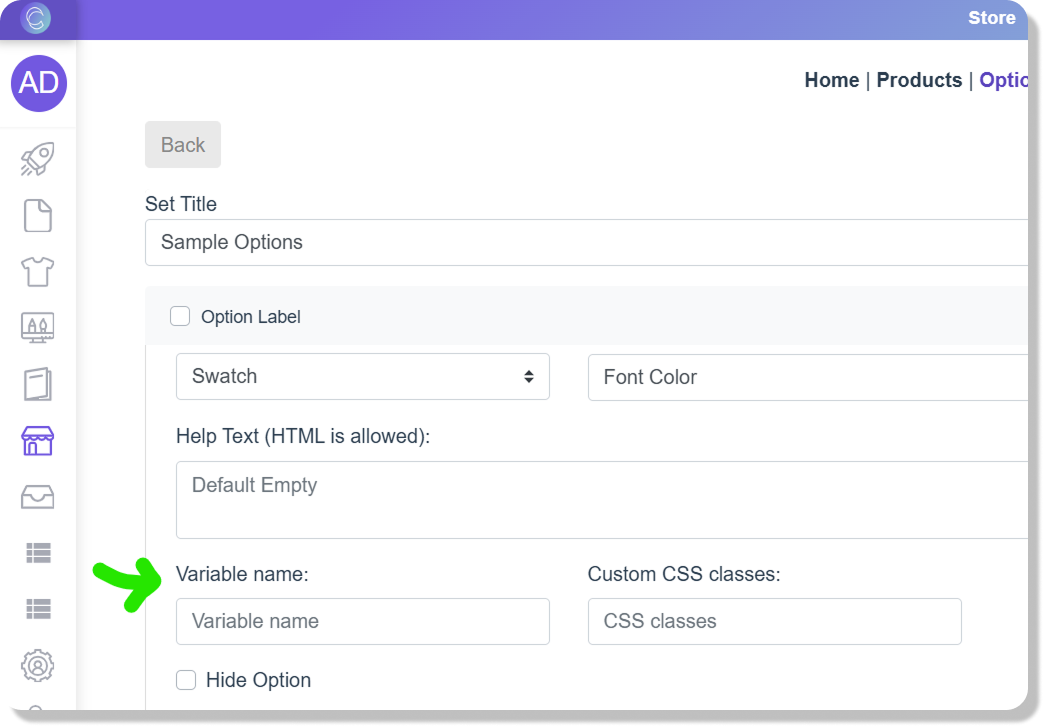
✨ How It Works: ✔ Define a 'Variable name' in your Text, Swatches, or Dropdown options (see below screenshot). ✔ For Swatches and Dropdowns, use the 'Value' field of the option to pass the value in the URL. ✔ The values persist when navigating to other products with matching variable names, ensuring a seamless experience.
🔗 Example: If you set "name" as your variable ('Variable name' in the option), you can generate a link like this: 👉 yourstore.com/productHandle?@name=John This will automatically populate the customization field with "John."
For Swatches and Dropdowns, use the 'Value' field to pass values like this: 👉 yourstore.com/productHandle?@color=Red
🔄 Persistent Customization: If a customer personalizes a product and then browses to another product with the same variable (e.g., "name" or "color"), the value will carry over—so they don’t have to enter it again!
This feature works with Text, Swatches, and Dropdown options, making it perfect for: 🚀 Streamlining the personalization process 🎯 Running targeted campaigns 🛍️ Enhancing the shopping experience
Try it out today!